![Rekor-Logo-Horiz-RevWhite-Web-1.svg]](https://help.rekor.ai/hubfs/Rekor-Logo-Horiz-RevWhite-Web-1.svg)
The Traffic Impact feature analyzes real-time telematics data alongside historical traffic patterns to assess the severity and reach of each incident. This provides immediate situational awareness—without additional hardware—so traffic operators can identify, prioritize, and manage the most disruptive events directly within Rekor Command.
Insight Panel
When an Event Card is selected for the first time, the Insight Panel is displayed.
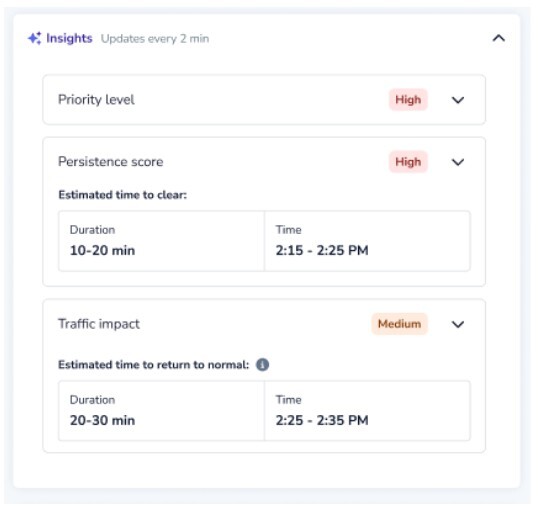
Traffic Impact Panel
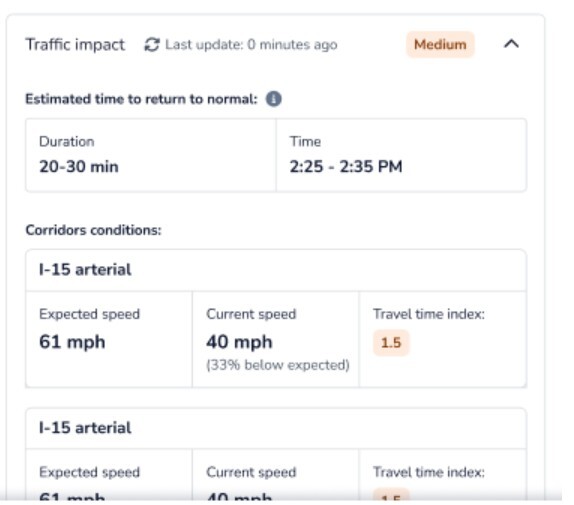
When nearby roads are affected, each impacted corridor is listed with key performance indicators, including current speed, expected speed, and travel time index. Corridors are ordered by severity to help operators focus on the most impacted areas first.
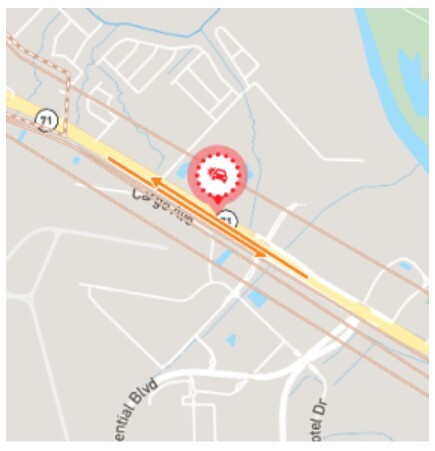
Operators can select Show on Map to visualize affected corridors directly on the Live Map.
Estimated Time to Return to Normal Traffic
The Traffic Impact panel now includes an Estimated Time to Return to Normal Traffic, which predicts how long it will take for traffic conditions to recover based on current conditions and historical trends.
This estimate is presented as:
- Duration (e.g., 20–30 minutes)
- Time window showing when normal traffic is expected to resume
This capability helps operators:
- Set clearer expectations with stakeholders and the public
- Make more informed decisions about incident response and mitigation
- Reduce uncertainty during evolving events
The estimate updates dynamically as traffic conditions change.
Availability
Please note: Traffic Impact is an Add-On feature and is not enabled by default. Customers must request activation for this feature to be available in their environment.